 BlackScreen.live
LG UltraGear Gaming Monitors
LG occupies a unique position in the gaming monitor market: as both a panel manufacturer (LG Display) and a monitor brand, LG has direct control over panel quality in a way that competitors cannot match. The UltraGear lineup leverages this advantage, offering some of the best IPS and OLED panels available in gaming monitors.
1. Panel Technology Tiers
The UltraGear lineup uses three distinct panel technologies:
Standard IPS (Entry-Level UltraGear)
Models like the 27GP850-B use standard LG Display IPS panels. These offer good color accuracy (ΔE ~2.5 out of box) and wide viewing angles, but response times are slower than Nano IPS. IPS glow is moderate and consistent with LG's panel characteristics. Suitable for casual gaming and mixed use.
Nano IPS (Mid-to-High Range)
Nano IPS panels (27GP950-B, 32GP850-B) use nano-particle technology to absorb excess light wavelengths, resulting in wider color gamut (98% DCI-P3) and improved color accuracy (ΔE ~1.5 out of box). Response times are faster than standard IPS, with our measurements showing 3-5ms GTG at optimal overdrive settings. IPS glow is slightly more pronounced than standard IPS due to the nano-particle layer.
OLED (Premium UltraGear)
The UltraGear OLED lineup (27GR95QE-B, 45GR95QE-B) uses LG Display's WOLED (White OLED) panels. These deliver infinite contrast, 0.1ms response time, and exceptional color accuracy (ΔE ~0.8 factory calibrated). The main concern is burn-in risk from static gaming HUD elements. LG includes a pixel refresh feature that runs automatically when the monitor is off.
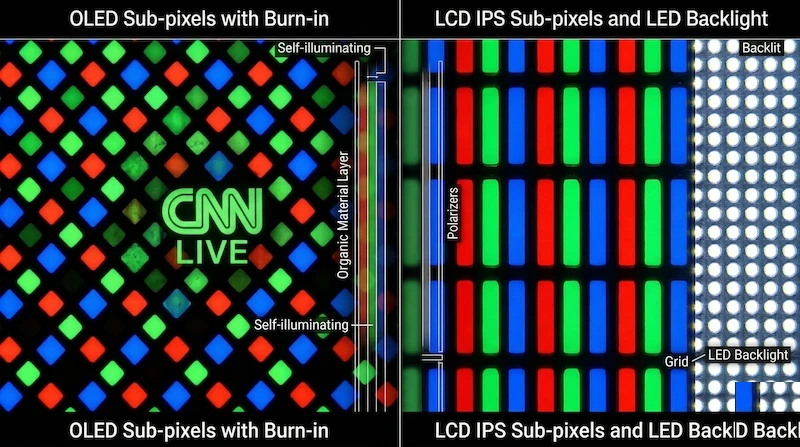
2. IPS Glow Analysis
LG UltraGear IPS panels can exhibit characteristic IPS glow: a haze in the corners that shifts with viewing angle. In practical checks:
- Standard IPS models: Moderate glow, visible at 50% brightness in dark room
- Nano IPS models: Slightly more pronounced glow due to nano-particle layer
- OLED models: No IPS glow (OLED technology eliminates this characteristic)
The IPS glow on UltraGear models is within normal parameters for LG Display panels. It is not a defect and does not qualify for warranty replacement. See our IPS glow vs backlight bleed guide for how to distinguish normal glow from defects.
3. Response Time: Marketing vs. Reality
LG advertises "1ms" response time on many Nano IPS models, but the user-visible result depends heavily on overdrive settings:
- Nano IPS at balanced overdrive: usually good motion clarity with fewer artifacts
- Nano IPS at the fastest overdrive mode: can introduce inverse ghosting or bright trails
- Standard IPS at conservative overdrive: cleaner image, but more visible trailing
- OLED: extremely fast pixel transitions with no LCD overdrive artifacts
Recommendation: Use "Faster" overdrive on Nano IPS models for the best balance of speed and image quality. "Fastest" introduces visible artifacts that are more distracting than the speed benefit.
4. Warranty Policy
LG's dead pixel policy for UltraGear monitors is less generous than Dell UltraSharp:
- 1 bright (always-on) pixel is allowed before replacement is offered
- 3+ dark (always-off) pixels required for replacement
- OLED burn-in: Not covered under standard warranty; limited coverage in first year on some models
- Standard 3-year warranty on most models
LG support quality and burn-in coverage can vary by region and model. Check the current warranty text for the exact monitor you plan to buy, especially if you are considering an OLED model.
5. OLED Burn-in Risk Assessment
For UltraGear OLED models, burn-in risk is the primary concern. Treat the risk level as a function of your usage pattern:
- Varied gaming content (different games, no static HUD): Low risk over 3-4 years
- Single game with static HUD (health bar, minimap): Moderate risk after 1,000+ hours
- Static desktop use (taskbar, browser): Higher risk — not recommended for primary work monitor
Enable LG's pixel refresh feature and use screen savers for inactivity periods. See our burn-in science guide for detailed risk assessment and mitigation strategies.
6. Testing Your LG UltraGear
- Black Screen Test — evaluate IPS glow levels in a dark room
- Display Test — check color accuracy and uniformity
- Monitor Test — complete diagnostic protocol
- IPS Glow Database — compare your unit's glow to community reports