 BlackScreen.live
Gaming Monitor Buying Guide 2026
The gaming monitor market is flooded with misleading specifications. "1ms response time" claims appear on VA panels that actually measure 8-12ms in real-world testing. "240Hz" monitors sometimes use frame interpolation rather than native refresh. "HDR" labels appear on monitors that barely qualify as HDR400—a tier that professional reviewers consider inadequate for true HDR content.
This guide cuts through the noise by explaining which specifications are measured under ideal conditions, which ones matter in real gameplay, and how to verify the basics on your own unit.
1. Refresh Rate: How Much Do You Actually Need?
Refresh rate is the number of times per second your monitor updates the image, measured in Hz. Higher refresh rates produce smoother motion and reduce motion blur, but the benefits diminish at higher values.
The Real-World Impact of Refresh Rate
- 60Hz → 144Hz: Massive, immediately noticeable improvement. Motion is dramatically smoother. This upgrade is worthwhile for virtually every gamer.
- 144Hz → 240Hz: Noticeable improvement, especially in competitive FPS games. Requires a GPU capable of consistently delivering 240+ FPS to realize the benefit.
- 240Hz → 360Hz: Marginal improvement visible only to highly trained competitive players. Requires extremely powerful hardware and is only relevant for professional esports.
- 360Hz → 500Hz+: Diminishing returns. The human visual system's ability to perceive individual frames plateaus around 300-400Hz for most people.
2. Resolution: 1080p vs 1440p vs 4K
1080p (1920×1080) — Full HD
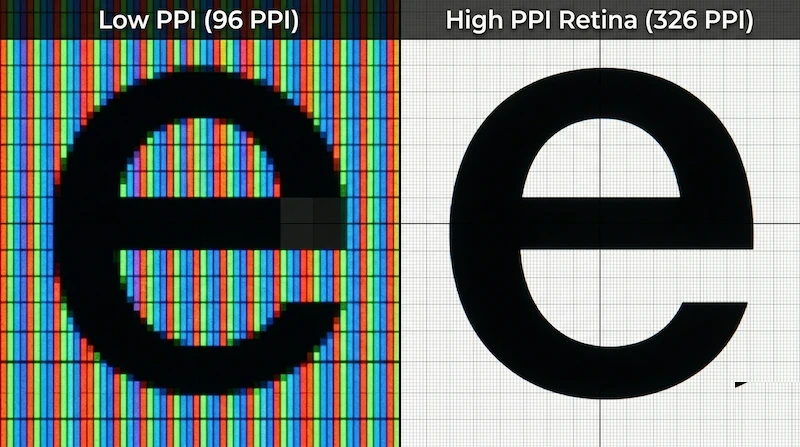
Still the dominant resolution for competitive gaming. Lower pixel count means less GPU load, enabling higher frame rates. At 24-27 inches, 1080p provides adequate pixel density (82-92 PPI). At 27+ inches, individual pixels become visible and image quality suffers. Best for: competitive gaming on mid-range hardware, esports titles.
1440p (2560×1440) — QHD
The sweet spot for most gamers in 2026. Significantly sharper than 1080p at 27 inches (109 PPI), with manageable GPU requirements. Modern mid-to-high-end GPUs can deliver 144+ FPS at 1440p in most titles. Best for: the majority of gamers who want both image quality and high refresh rates.
4K (3840×2160) — UHD
Exceptional image quality but demanding on GPU resources. Achieving 144+ FPS at 4K requires top-tier hardware (RTX 4080/4090 or RX 7900 XTX class). At 27 inches, 4K provides 163 PPI—genuinely sharp. Best for: single-player games, content consumption, users with high-end GPUs who prioritize image quality over frame rate.
3. Panel Type for Gaming
IPS for Gaming
Modern Fast IPS panels (LG Nano IPS, AU Optronics AHVA) have dramatically improved response times, reaching 1-4ms GTG. Combined with excellent color accuracy and wide viewing angles, IPS is now the recommended panel type for most gamers. The main drawback is IPS glow, which is visible in dark scenes. Our IPS glow guide explains how to evaluate this before purchase.
VA for Gaming
VA panels offer superior contrast ratios (3000:1 to 6000:1) that make dark scenes in games look dramatically better than IPS. However, VA panels suffer from black smearing—a ghosting artifact in dark, fast-moving content. This is particularly noticeable in games with dark environments. Newer VA panels have improved, but IPS remains preferable for most gaming use cases.
OLED for Gaming
OLED gaming monitors (LG UltraGear OLED, Alienware QD-OLED) offer the best gaming experience money can buy: 0.1ms response time, infinite contrast, perfect blacks, and wide color gamut. The main concerns are burn-in risk from static HUD elements and higher price. For gamers who play varied content and use pixel refresh features, OLED is the premium choice.
4. Adaptive Sync: G-Sync vs FreeSync
Adaptive sync technology eliminates screen tearing by synchronizing your monitor's refresh rate to your GPU's frame output. Both NVIDIA G-Sync and AMD FreeSync accomplish the same goal through different implementations.
NVIDIA G-Sync
- G-Sync (proprietary module): Requires NVIDIA GPU. Uses a dedicated hardware module in the monitor for the most consistent performance. Typically adds $100-200 to monitor cost.
- G-Sync Compatible: NVIDIA-certified FreeSync monitors that work with G-Sync. No hardware module, but tested and approved by NVIDIA. Most modern FreeSync monitors qualify.
- G-Sync Ultimate: Premium tier requiring HDR1000 certification, wide color gamut, and ultra-low latency. Very few monitors qualify.
AMD FreeSync
- FreeSync: Basic adaptive sync, variable refresh rate range varies by monitor.
- FreeSync Premium: Requires 120Hz+ at FHD, LFC (Low Framerate Compensation) support.
- FreeSync Premium Pro: Adds HDR support and low latency mode requirements.
In practice, G-Sync Compatible and FreeSync Premium monitors provide essentially identical experiences for most gamers. The proprietary G-Sync module is only worth the premium for users who need guaranteed performance at the extremes of the VRR range.
5. Response Time: Separating Fact from Marketing
Response time specifications are among the most misleading in the monitor industry. Manufacturers measure and report the best-case scenario, often using aggressive overdrive settings that introduce inverse ghosting (coronas around moving objects).
Gray-to-gray (GTG) response time is normally measured across a limited set of transitions, and manufacturers often publish the fastest result rather than a full average. In real use, these patterns are common:
- Advertised "1ms" VA panels can still show visible dark-level smearing
- Fast IPS panels usually handle motion well, but overdrive settings can introduce inverse ghosting
- OLED panels have extremely fast pixel transitions, with burn-in management as the main trade-off
- TN panels remain fast, but their color and viewing-angle limitations matter for mixed use
For practical gaming, response times below 5ms GTG are imperceptible to most players. The difference between 1ms and 5ms is 4ms—less than the frame time at 240Hz (4.17ms). Focus on avoiding panels with severe ghosting rather than chasing the lowest advertised number.
6. Input Lag: The Specification Nobody Advertises
Input lag is the delay between your mouse/keyboard input and the corresponding change on screen. Unlike response time (a panel characteristic), input lag is determined by the monitor's signal processing pipeline. A monitor with 1ms response time but 30ms input lag will feel sluggish.
Good gaming monitors keep processing delay low in game mode. Image-processing features such as motion interpolation, noise reduction, dynamic contrast, or heavy local-dimming logic can add latency. Always enable "Game Mode" or disable unnecessary processing features when gaming.
7. HDR for Gaming: What the Tiers Actually Mean
- DisplayHDR 400: Minimum HDR certification. 400 nits peak brightness, no local dimming required. Provides minimal HDR benefit—essentially SDR with a wider color gamut.
- DisplayHDR 600: Meaningful HDR performance. 600 nits peak, some local dimming. Noticeable improvement over SDR in HDR content.
- DisplayHDR 1000: True HDR performance. 1000 nits peak, full-array local dimming or OLED. Significant HDR impact in supported games.
- DisplayHDR True Black 400/600: OLED-specific tier. True black (0 nits) with 400-600 nits peak. Exceptional HDR contrast despite lower peak brightness.
8. Testing Your New Gaming Monitor
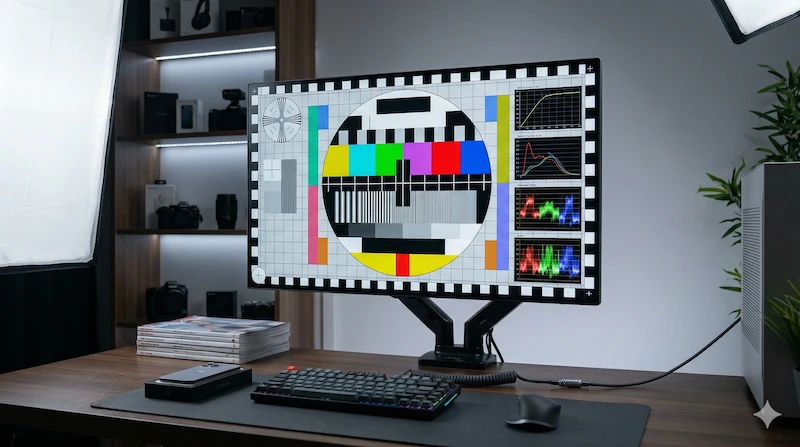
After purchasing a gaming monitor, always test it before your return window closes. Use our diagnostic tools:
- Display Test — check for dead pixels, backlight bleed, and color uniformity
- Black Screen Test — evaluate backlight bleed and IPS glow in dark gaming scenes
- Monitor Test — complete diagnostic protocol following ISO 9241-307 standards
- PPI Calculator — verify pixel density is appropriate for your viewing distance