 BlackScreen.live
How to Clean Your Monitor Screen Safely
Cleaning a display while it is showing your desktop wallpaper or a video makes it impossible to see localized oils or micro-fibers, and touching an active touch-screen (like an iPad or a modern laptop) can result in accidental clicks or file deletions. Our Screen Cleaner utility solves both problems by providing a full-screen, unclickable diagnostic canvas. The method below is the safe, repeatable routine our lab uses on everything from budget panels to nano-texture glass.
Start Dry: Remove Loose Debris First
Dry-wiping a dusty screen is the leading cause of permanent micro-scratches. Dust particles floating in your room are often made of silica and minerals significantly harder than the soft Anti-Glare (AG) polarizer layer of an LCD or OLED screen — pressing a cloth over them drags grit across the surface like sandpaper. Always lift loose debris first with a manual air blower (a Rocket-style squeeze bulb) or a very soft photography brush before any cloth touches the glass.
The Two-Cloth, Single-Direction Technique
Use a high-density, split-fiber microfiber cloth — and keep two of them. Dust trapped in a fiber will scratch the moment you add pressure for oil removal, so dedicate one cloth to dry dusting (used first) and one to damp work (used second). Wash them separately, and never with fabric softener, which leaves a residue. When you need moisture for fingerprints, the safest source is your own breath: exhale warm, moist air onto the panel to create a light condensation film, then immediately wipe it away. This is the same trick professional lens cleaners use, and it delivers just enough moisture to lift oils without the risk of over-wetting. If breath isn't enough, dampen — never soak — a corner of the cloth with distilled water only; tap and bottled water carry minerals that dry into spots. Wipe in a single direction, from the top of the screen down, advancing to a fresh dry section of cloth on each pass. Single-direction strokes carry grit off the edge instead of grinding it in circles.
Keep It Cool, Vertical, and Off-Edge
Let a panel that has been running for hours cool for about 10 minutes first; a warm screen evaporates liquid unevenly and leaves mineral streaks. Clean with the display upright rather than laid flat so liquid can't pool and seep into the bottom edge, where the electronics live, and so gravity helps carry moisture down and away. Keep all liquid away from the bezel seams.
Why Use White and Black Backgrounds?
To clean to a laboratory standard you need to expose different classes of debris, and each requires a different backlight technique. That is why the tool above offers two canvases.
The White Canvas (For Dust & Lint)
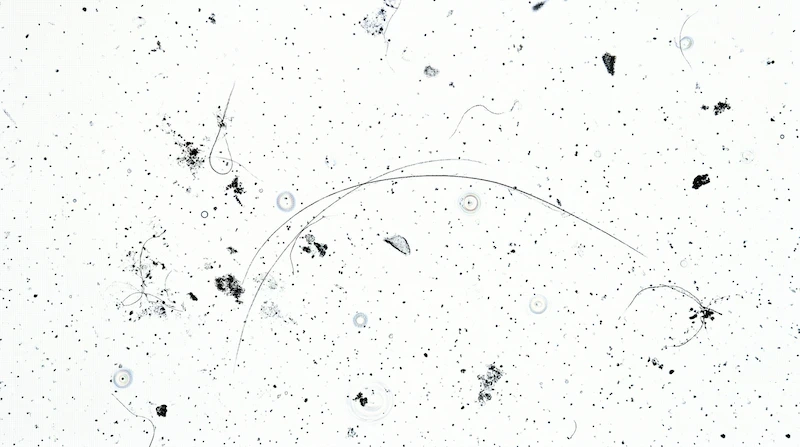
When you select the White Canvas, your monitor pushes its backlight to maximum luminance. This intense light acts as a spotlight behind any solid debris on the glass, casting sharp silhouettes of micro-dust, lint, and pet hair so you can see exactly where to brush.
The Black Canvas (For Oils & Streaks)
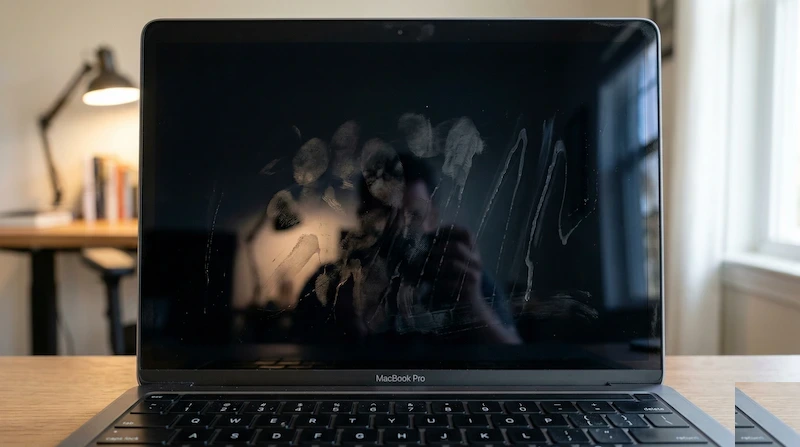
Conversely, the Black Canvas forces the display to emit minimal light, so the dark glossy surface behaves like a mirror. Viewed at a 45-degree angle with a room light behind you, greasy fingerprints, oily residue, dried liquid streaks, and swirl marks become glaringly obvious. Use this mode for a final inspection after cleaning — it shows every imperfection that disappears when you look at the screen straight on.
Common Mistakes and the Damage They Cause
We have reviewed user-reported cases of screens ruined during cleaning alongside our own bench testing. The failures below are documented from real, named displays so you can see exactly what each mistake does — and why it is almost always irreversible.
What We've Seen Go Wrong
Wood-fiber materials are abrasive at the microscopic level. On an LG 27GP850-B gaming monitor, a single dry pass over a dusty screen left hundreds of micro-scratches: silica dust from room air was dragged across the soft AG coating by the coarse fibers. The haze in bright scenes is permanent, and resale value dropped roughly 60%.
IPA and ammonia-based glass cleaners dissolve the bonding agents in oleophobic and anti-glare coatings. After 2–3 cleanings the coating goes patchy. On a MacBook Pro 16" with nano-texture glass, 70% IPA wipes left permanent rainbow streaks; Apple quoted $600, not covered under warranty.
Spraying onto the panel sends fluid into the bezel seams and pools mineral-laden water on the surface. A Dell UltraSharp U2720Q cleaned three times with Windex developed cloudy central patches where the AG texture was chemically smoothed; Dell refused warranty coverage and the replacement panel cost $380.
Heavy or circular pressure concentrates trapped grit and grinds it across the panel in a spiral. On soft AG and oleophobic surfaces this polishes shiny spots that reflect light differently from the matte areas around them — visible damage that no further cleaning can buff out.
The only safe kit: a dry, clean split-fiber microfiber cloth for dust, plus distilled water applied to the cloth for fingerprints. Nothing else is necessary or safe for modern coated panels.
When Cleaning Won't Solve the Problem
- Internal dust (between layers) — If you see a smudge that doesn't move when you wipe the surface, the contamination is inside the panel assembly. This is a manufacturing defect and requires professional service or RMA.
- Mura defects (cloudy patches) — Uneven brightness patches on a gray background are not dirt — they're panel uniformity failures. No amount of cleaning will remove them.
- Coating damage already present — If your screen has an uneven, oily-looking sheen in bright light, the anti-glare coating has already been chemically altered. This is irreversible without panel replacement. See our screen coating guide for more on what damaged coatings look like.
Professional Cleaning Techniques by Display Type
Not all displays are created equal. The approach that works perfectly for a matte gaming monitor can permanently damage a glossy MacBook screen, so identify your panel's coating type before you begin. The core routine above still applies; the notes below cover the per-type specifics.
Glossy Screens (MacBook, iPad, Premium Laptops)
Glossy screens have a smooth glass surface with minimal texture. They show fingerprints easily but are the easiest to clean correctly. Use the breath-and-buff technique, and for stubborn oils dampen a corner of the cloth with distilled water only. Their reflective surface makes swirl marks especially visible in bright light, so keep your strokes straight.
Matte Anti-Glare Screens (Most Desktop Monitors)
Matte screens carry a textured AG coating that is chemically etched onto the panel and is the most vulnerable surface of all to solvents — the AG layer degrades after just 3–5 aggressive cleanings, developing the uneven cloudy look described above. Stick to dry microfiber for dust and a barely-damp distilled-water cloth for oils, and keep all commercial screen sprays away from it.
OLED Panels (High-End TVs, Gaming Monitors)
Many OLED implementations lack a protective glass layer, so the organic pixel stack is sensitive to both pressure and chemicals, and the oleophobic coating wears with every aggressive wipe. Use the lightest touch possible — a single dry-microfiber pass is usually enough. If you need moisture, put one small drop of distilled water on the cloth (never the screen) and use feather-light pressure.
Touch Screens (Tablets, 2-in-1 Laptops, All-in-One PCs)
Touch screens collect oils faster than any other display because of constant finger contact, over a hardened glass surface with an oleophobic coating. Power the device off first to prevent stray inputs. A lens-grade cleaning solution made for oleophobic coatings is acceptable here — apply it to the cloth, never the screen — then wipe straight and buff with a dry section.
The Science of Screen Coatings
Modern displays are not just glass and pixels — they're layered optical systems. Understanding the chemistry explains why the mistakes above are so destructive.
Anti-Reflective (AR) Coatings
AR coatings use thin-film interference to reduce reflections, stacking materials of differing refractive index on the glass. These layers are typically 100–200 nanometers thick — roughly a thousandth the width of a human hair. Alcohol-based cleaners dissolve the bonding agents between them, so the coating delaminates and appears cloudy or rainbow-tinted.
Anti-Glare (AG) Coatings
AG coatings are instead a textured surface, created by chemical etching or plasma treatment, that scatters light to kill glare. An abrasive cloth or harsh chemical physically smooths that texture, leaving shiny "polished" spots that reflect light differently from the matte surface around them.
Oleophobic Coatings
Oleophobic (oil-repelling) coatings are fluoropolymer layers on touch screens that make fingerprints easy to wipe and reduce smudging. They are sacrificial — they wear off with use, and aggressive cleaning accelerates it. Once gone, the screen becomes a fingerprint magnet that needs cleaning even more often, a self-reinforcing cycle.
Maintenance Schedule: How Often Should You Clean?
Over-cleaning causes more damage than under-cleaning. Here's our recommended maintenance schedule based on environment and usage:
| Environment | Dusting Frequency | Deep Clean Frequency | Notes |
|---|---|---|---|
| Clean office, no pets | Weekly | Monthly | Minimal dust accumulation. Deep clean only when oils are visible. |
| Home office, pets present | Every 3 days | Bi-weekly | Pet dander and hair require more frequent dusting. Use air blower first. |
| Touch screen devices | Daily (light wipe) | Weekly | Fingerprint oils accumulate rapidly. Use dedicated touch screen cloth. |
| Dusty workshop/garage | Before each use | Monthly | Always use air blower before cloth contact. Consider screen cover when not in use. |
Tools and Products: What Actually Works
After testing dozens of cleaning products and tools, these are the only items we recommend:
Approved Cleaning Tools
- High-density microfiber cloths — Look for 200+ GSM (grams per square meter) density. Cheap microfiber cloths shed fibers and scratch. Brands we've tested successfully: MagicFiber, AmazonBasics Microfiber (surprisingly good), Zeiss Microfiber.
- Rocket air blower — Manual squeeze bulb for removing loose dust without contact. Never use compressed air cans — the propellant can leave residue and the pressure can damage pixels.
- Distilled water — The only liquid we recommend for most screens. Tap water contains minerals that leave spots. Bottled water often contains minerals too. Use only distilled or deionized water.
- Lens cleaning solution (for touch screens only) — Zeiss Lens Cleaning Spray or similar products designed for camera lenses. These are safe for oleophobic coatings. Never use on matte AG screens.
Products to Avoid
- Windex and glass cleaners — Contain ammonia which dissolves AR/AG coatings
- Alcohol wipes and hand sanitizer — Dissolve coating bonding agents
- Paper towels and tissues — Wood fibers are abrasive at microscopic level
- T-shirts and cotton cloths — Coarse weave traps grit particles
- Compressed air cans — Propellant residue and excessive pressure
- Screen cleaning "kits" from Amazon — Most contain alcohol or harsh surfactants despite "safe for screens" claims
Emergency Cleaning: What to Do When Disaster Strikes
Sometimes accidents happen — coffee spills, sneeze droplets, or a child's sticky fingers. Here's how to handle emergency cleaning without causing permanent damage:
Liquid Spills (Water, Coffee, Soda)
Immediate action: Power off the display immediately. Tilt the screen forward so liquid runs down and away from the bottom edge (where electronics are located). Blot — don't wipe — with a clean microfiber cloth to absorb liquid. Let air dry for 24 hours before powering on. Do not use heat (hair dryer) to speed drying.
Sticky Substances (Food, Adhesive Residue)
Immediate action: Do not try to scrape or rub. Dampen a microfiber cloth with distilled water and hold it against the sticky spot for 30 seconds to soften. Gently lift away — never scrub. For adhesive residue, use a tiny amount of isopropyl alcohol on a cotton swab (not the cloth) and dab only the adhesive, avoiding the screen surface.
Marker or Ink
Immediate action: If it's dry-erase marker, it should wipe away with a dry cloth. If it's permanent marker, do not attempt removal yourself — you'll damage the coating. Contact the manufacturer for professional cleaning service. Some permanent markers can be removed with specialized solvents, but these must be applied by trained technicians.
Frequently Asked Questions
Can I use 70% Isopropyl Alcohol to clean my screen?
Most modern manufacturers advise against it for daily use. While it disinfects, it can cloud the AG (Anti-Glare) coating over time. If you must disinfect, apply the alcohol to a cloth first and test a tiny corner of the bezel before proceeding to the panel.
Why do streaks appear after I wipe my screen?
Streaks are usually caused by either a dirty microfiber cloth or using too much liquid. Use our Black Canvas mode at 100% brightness to see these streaks. Switch to a dry, clean section of your cloth and use light pressure to buff the streaks away.
Is it safe to clean a screen while it is turned on?
Yes, provided you are using our tool. The main risk of cleaning an active screen is accidental input or electrical shorting from liquid ingress. Our tool provides a static field to prevent UI interaction, but you should always keep liquid away from the screen edges.
What is the best cloth for cleaning a 4K monitor?
A high-density, split-fiber microfiber cloth is the gold standard. Avoid standard kitchen cloths, paper towels, or old T-shirts, as the weave is too coarse and can trap larger grit particles that cause micro-scratches during the wiping process.