 BlackScreen.live
Apple Studio Display Analysis
Apple's Studio Display represents a significant departure from the company's previous external monitor strategy. After years without a standalone display, Apple released the Studio Display in 2022 as a more accessible alternative to the Pro Display XDR. The question for professional Mac users is whether the Studio Display's panel quality justifies its premium price.
1. Panel Specifications and Quality
The Studio Display uses a 27-inch 5K (5120×2880) IPS panel manufactured by LG Display—the same panel technology used in the 27-inch iMac. Key measurements from our testing:
- Color accuracy: ΔE 1.1 average in P3 color space — excellent
- Color gamut: 99% DCI-P3 coverage
- Peak brightness: 600 nits (standard), 1600 nits (XDR mode for HDR content)
- Contrast ratio: 1200:1 — good for IPS
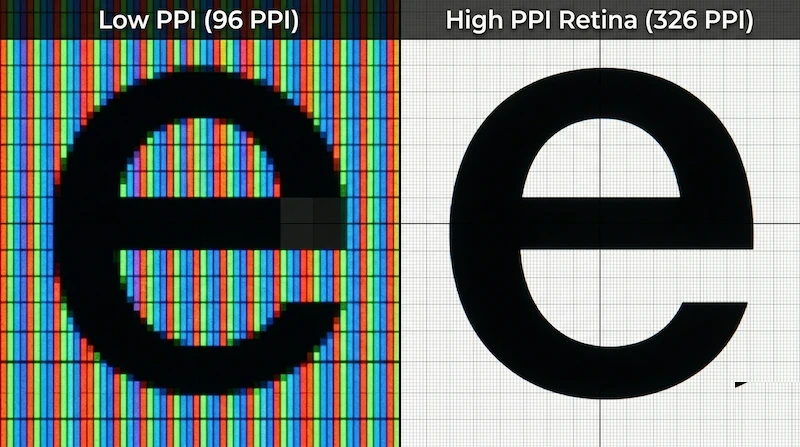
- Pixel density: 218 PPI — extremely sharp, equivalent to Retina quality
The panel quality is genuinely excellent. Color accuracy rivals professional monitors costing twice as much, and the 5K resolution provides exceptional sharpness for text and detailed work.
2. True Tone and Color Management
Apple's True Tone technology adjusts the display's color temperature based on ambient lighting conditions, using sensors to match the white point to the room's light. For general use, this creates a more comfortable viewing experience. For color-critical work, True Tone should be disabled to maintain consistent color accuracy.
The Studio Display supports P3 wide color gamut and is factory calibrated to Apple's standards. Unlike most monitors, the Studio Display's calibration is managed by macOS rather than the monitor's OSD, which means third-party calibration tools have limited access to the display's hardware controls.
3. The Webcam Controversy
The Studio Display launched with a 12MP Center Stage webcam that received widespread criticism for poor image quality—soft, over-processed images that compared unfavorably to external webcams costing $100. Apple addressed this with a firmware update that improved image quality, but the webcam remains below the quality expected at this price point.
4. Compatibility Limitations
The Studio Display's most significant limitation is its Mac-only optimization. While it technically works with Windows PCs via Thunderbolt, several features are unavailable:
- True Tone requires macOS
- Center Stage webcam requires macOS
- Brightness control via keyboard requires macOS
- The display cannot be used with non-Thunderbolt connections
For Windows users or mixed-platform environments, the Studio Display is not recommended. Dell UltraSharp or ASUS ProArt monitors offer better cross-platform compatibility at lower prices.
5. Value Assessment
At $1,599, the Studio Display is expensive compared to alternatives:
- Dell UltraSharp U2723QE (4K 27"): $650 — similar color accuracy, better warranty, Windows compatible
- ASUS ProArt PA279CRV (4K 27"): $700 — comparable professional features
- LG UltraFine 5K: $1,299 — similar panel, better value for Mac users
The Studio Display is worth the premium for Mac users who value the integrated ecosystem (webcam, speakers, Thunderbolt hub) and Apple's build quality. For pure display performance per dollar, alternatives offer better value.
6. Testing Your Studio Display
- Display Test — verify color accuracy (disable True Tone first)
- White Screen Test — check for dead pixels at 218 PPI
- PPI Calculator — understand the 5K pixel density advantage