 BlackScreen.live
LCD vs OLED Technology
The choice between LCD and OLED is the most consequential decision in display technology. These two technologies differ not just in performance metrics but in their fundamental physical mechanisms—and understanding those mechanisms explains why each technology excels in different scenarios.
1. How LCD Works
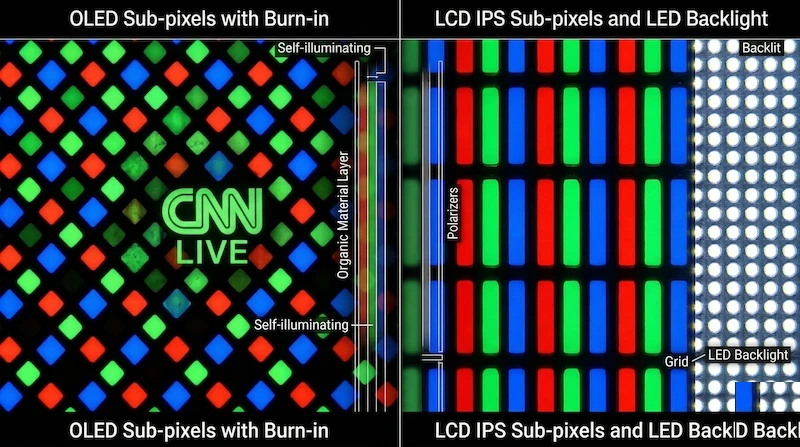
An LCD panel is a light-modulating device. It does not generate light itself—instead, it controls how much light from a separate backlight passes through to your eyes. The core components are:
- Backlight: An array of LEDs (edge-lit or direct-lit) that provides constant illumination
- Polarizer layers: Two polarizing filters oriented 90° to each other
- Liquid crystal layer: Molecules that rotate polarized light when voltage is applied
- Color filter array: Red, green, and blue filters over each sub-pixel
- TFT (Thin-Film Transistor) array: Individual transistors controlling each sub-pixel
When no voltage is applied to a liquid crystal cell, the crystals are aligned to rotate polarized light 90°, allowing it to pass through the second polarizer (pixel appears bright). When voltage is applied, the crystals align with the electric field and stop rotating the light, blocking it at the second polarizer (pixel appears dark). This is why LCD blacks are never truly black—the backlight is always on, and some light always leaks through even at maximum "off" state.
2. How OLED Works
OLED panels are self-emissive—each pixel generates its own light. The structure is fundamentally simpler than LCD:
- Anode layer: Transparent electrode (typically ITO)
- Organic emission layers: Multiple organic compound layers that emit light when current flows
- Cathode layer: Metal electrode
- TFT backplane: Controls current to each pixel
When current flows through the organic layers, electrons and holes recombine in the emission layer, releasing energy as photons. The color of emitted light depends on the organic compound used. When no current flows, the pixel emits no light—achieving true black (0 nits).
3. The Contrast Ratio Difference
This fundamental architectural difference explains the contrast ratio gap between LCD and OLED:
- LCD: Contrast ratio limited by backlight leakage. Best LCD panels achieve ~1500:1 native contrast. With local dimming, effective contrast can reach 10,000:1 in some zones.
- OLED: True black = pixel off = 0 nits. Contrast ratio is theoretically infinite. In practice, measured as >1,000,000:1 against a single bright pixel on a black background.
4. Response Time
LCD response time is limited by the physical rotation speed of liquid crystal molecules. Even with overdrive voltage, the fastest IPS panels achieve ~1-3ms GTG. OLED response time is limited only by the speed of electron-hole recombination in organic compounds—typically 0.01-0.1ms, 10-100x faster than LCD.
This difference is most visible in fast-moving content: LCD panels show motion blur from slow pixel transitions, while OLED panels maintain sharp edges even at high speeds.
5. Color Accuracy and Gamut
Both technologies can achieve excellent color accuracy, but through different mechanisms:
- LCD: Color accuracy depends on backlight spectrum and color filter quality. Wide color gamut requires quantum dot or phosphor-based backlights. Factory calibration can achieve ΔE < 1.0.
- OLED: Color is determined by organic compound emission spectrum. WOLED (White OLED) uses white emission with color filters, similar to LCD. QD-OLED uses blue OLED with quantum dot color conversion for wider gamut. Factory calibration typically achieves ΔE < 1.0.
6. Burn-in: OLED's Fundamental Limitation
OLED's organic compounds degrade over time as current flows through them. Different colors degrade at different rates—blue OLEDs degrade faster than red and green. When static content is displayed for extended periods, the pixels showing that content degrade faster than surrounding pixels, creating a permanent "ghost" image.
LCD panels do not experience burn-in because the liquid crystals are not consumed by operation. The backlight LEDs do degrade over time (losing brightness), but this is uniform across the panel and does not create image retention.
See our burn-in science guide for detailed analysis of OLED degradation mechanisms and prevention strategies.
7. Power Consumption
Power consumption depends heavily on content:
- LCD: Relatively constant power consumption regardless of content (backlight is always on). Typical 27" monitor: 25-40W.
- OLED: Power consumption scales with brightness and content. Dark content uses very little power; bright white content uses significantly more. A 27" OLED displaying full white can use 60-80W—more than equivalent LCD.
8. Which Technology Should You Choose?
Choose OLED if: you prioritize contrast and black levels, watch dark content (movies, games with dark environments), need the fastest response time, or want the best overall image quality and can manage burn-in risk.
Choose LCD (IPS) if: you display static content for long periods (spreadsheets, code, taskbars), need consistent brightness across the panel, want zero burn-in risk, or are on a budget.
Choose LCD (VA) if: you want better contrast than IPS without OLED's burn-in risk, primarily watch movies and dark content, and can tolerate slower response times.
Sources & Further Reading
The Future of Display Technology
The LCD vs OLED dichotomy is evolving rapidly. Three emerging technologies are reshaping the landscape: QD-OLED, Mini-LED LCD, and Micro-LED.
QD-OLED: The Hybrid Approach
QD-OLED (Quantum Dot OLED) combines OLED's self-emissive pixels with a quantum dot color conversion layer. Samsung Display's QD-OLED panels use blue OLED emitters with quantum dots that convert blue light to red and green, achieving wider color gamut (99% DCI-P3) than traditional WOLED panels (98% DCI-P3). The result is OLED's infinite contrast and fast response time with improved color volume at high brightness levels. QD-OLED is currently used in Samsung Odyssey OLED, Alienware QD-OLED, and MSI QD-OLED gaming monitors.
Mini-LED LCD: Closing the Gap
Mini-LED technology uses thousands of tiny LEDs as the backlight, enabling hundreds to thousands of local dimming zones. Samsung's Neo QLED monitors use 2048 dimming zones, delivering contrast ratios that approach OLED performance while maintaining LCD's advantages: higher peak brightness (2000+ nits), no burn-in risk, and lower cost. Mini-LED is the technology that makes DisplayHDR 1000 and 2000 certifications achievable in LCD monitors.
Micro-LED: The Long-Term Future
Micro-LED uses microscopic inorganic LED emitters for each pixel — combining OLED's per-pixel control with inorganic LED's longevity and brightness. Micro-LED eliminates burn-in risk while achieving infinite contrast and extremely high peak brightness. Currently limited to very large, very expensive displays (Samsung's The Wall), Micro-LED is expected to reach consumer monitor sizes within 5-10 years as manufacturing costs decrease.
Making the Right Choice Today
For most users in 2026, the choice comes down to: IPS LCD for professional color work and general use (best value, no burn-in risk), OLED for premium gaming and media consumption (best image quality, burn-in management required), and Mini-LED LCD for HDR gaming without burn-in risk (high brightness, near-OLED contrast). Use our monitor test to evaluate any display you're considering purchasing.
Frequently Asked Questions
Is OLED better than LCD for all use cases?
OLED excels in contrast, response time, and viewing angles, but LCD has advantages in peak brightness, burn-in resistance, and cost. For gaming and media consumption, OLED is generally superior. For professional work with static content or bright environments, high-quality IPS LCD may be preferable.
How long do OLED monitors last compared to LCD?
Modern OLED panels are rated for 30,000-100,000 hours to half-brightness, comparable to LCD backlights. The more relevant concern is burn-in from static content rather than overall lifespan. With proper usage habits (varied content, screen savers, pixel refresh), OLED monitors can last 5-10+ years without significant degradation.
Can I use an OLED monitor for office work?
Yes, but with precautions. Enable auto-sleep after 10-15 minutes of inactivity, use dark mode in applications, and vary your content. The main risk is static taskbar and UI elements causing differential aging. Modern OLED monitors include pixel refresh cycles that mitigate this risk significantly.