 BlackScreen.live
Choosing the Right Panel Type
The single most important decision when buying a monitor is the panel technology. It determines your contrast ratio, color accuracy, response time, viewing angles, and susceptibility to defects like backlight bleed and burn-in. Yet most buyers focus on resolution and refresh rate while treating panel type as an afterthought.
This guide cuts through the marketing language to explain what each panel type actually delivers in real-world use, including the strengths, trade-offs, and defects buyers should check before the return window closes.
1. IPS (In-Plane Switching)
How IPS Works
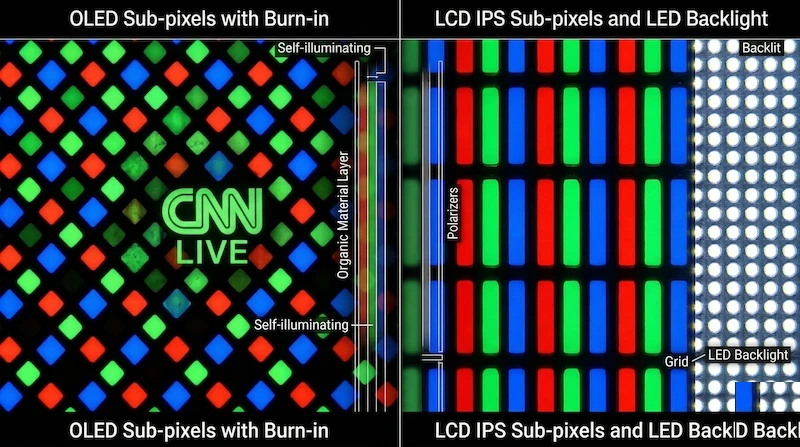
IPS panels align liquid crystals parallel to the glass substrate and rotate them in-plane when voltage is applied. This alignment method produces consistent color at wide viewing angles because the crystal orientation changes minimally when viewed from the side.
Key characteristics:
- Viewing angles: 178° horizontal and vertical (excellent)
- Color accuracy: Excellent, typically ΔE < 2 after calibration
- Contrast ratio: 800:1 to 1500:1 (moderate)
- Response time: 4-8ms GTG (good, but not the fastest)
- IPS glow: Present in all IPS panels (normal characteristic, not a defect)
- Backlight bleed: Moderate risk, varies by unit
Best for: Photo editing, graphic design, color-critical work, general productivity, multi-monitor setups where color consistency across viewing angles matters.
Avoid if: You need maximum contrast for dark room gaming or movie watching, or if you are extremely sensitive to IPS glow.
2. VA (Vertical Alignment)
How VA Works
VA panels align liquid crystals perpendicular to the glass substrate. When no voltage is applied, the crystals block light almost completely, producing very deep blacks. This gives VA panels their signature high contrast ratios.
Key characteristics:
- Viewing angles: 178° specified, but significant color shift at 30°+ (moderate)
- Color accuracy: Good, but color shifts with viewing angle
- Contrast ratio: 2500:1 to 6000:1 (excellent)
- Response time: 8-16ms GTG (slower, ghosting risk)
- Black smearing: Common issue in fast-moving dark content
- Corner clouding: More common than IPS
Best for: Movie watching, dark room gaming, content consumption where deep blacks matter more than color accuracy.
Avoid if: You do color-critical work, use the monitor from off-axis positions, or play fast-paced games where ghosting is noticeable.
3. TN (Twisted Nematic)
How TN Works
TN panels were the first LCD technology and remain the fastest in terms of pixel response time. Liquid crystals twist when voltage is applied, but this twisting mechanism produces poor viewing angles and limited color reproduction compared to IPS and VA.
Key characteristics:
- Viewing angles: 170° specified, but severe color shift at 20°+ (poor)
- Color accuracy: Limited, typically 6-bit panels with dithering
- Contrast ratio: 600:1 to 1000:1 (below average)
- Response time: 1-4ms GTG (fastest of all LCD types)
- Color gamut: Usually limited to 72% NTSC / 99% sRGB
Best for: Competitive gaming where response time is the absolute priority and color accuracy is irrelevant.
Avoid if: You do any color work, watch movies, or use the monitor from any position other than directly in front.
4. OLED (Organic Light-Emitting Diode)
How OLED Works
OLED panels are fundamentally different from LCD technologies. Each pixel generates its own light using organic compounds that emit light when current flows through them. When a pixel displays black, it simply turns off completely, producing true zero-emission black levels.
Key characteristics:
- Viewing angles: True 180° with no color shift (best available)
- Color accuracy: Exceptional, typically ΔE < 1 factory calibrated
- Contrast ratio: Infinite (true black = pixel off)
- Response time: 0.1ms GTG (fastest available)
- Burn-in risk: Real concern for static content (see our burn-in guide)
- Peak brightness: High (800-1000 nits) but sustained brightness lower than LCD
Best for: Premium gaming, HDR content, professional color work, anyone who wants the best possible image quality and can manage burn-in risk.
Avoid if: You display static content for long periods (taskbars, HUDs, spreadsheets) without using pixel refresh features.
5. Head-to-Head Comparison
| Characteristic | IPS | VA | TN | OLED |
|---|---|---|---|---|
| Contrast Ratio | 1000:1 | 4000:1 | 800:1 | Infinite |
| Color Accuracy | Excellent | Good | Limited | Exceptional |
| Viewing Angles | Excellent | Moderate | Poor | Perfect |
| Response Time | 4-8ms | 8-16ms | 1-4ms | 0.1ms |
| Burn-in Risk | None | None | None | Present |
| Price | Moderate | Moderate | Low | High |
| IPS Glow | Present | None | None | None |
6. Which Panel Type Should You Choose?
For Photo and Video Editing
Choose IPS for most workflows, or OLED if budget allows. IPS provides excellent color accuracy, wide viewing angles, and no burn-in risk. OLED offers superior contrast and color volume but requires careful management of static UI elements. Avoid VA (color shift affects accuracy) and TN (insufficient color depth).
For Competitive Gaming
Choose IPS (modern Fast IPS panels reach 1ms GTG) or TN for maximum response time. OLED is excellent if you can afford it. VA panels are generally not recommended for fast-paced gaming due to black smearing.
For Movie Watching and Casual Gaming
Choose VA for the best contrast ratio at a reasonable price, or OLED for the ultimate experience. IPS is also excellent. TN is not recommended due to poor viewing angles and color reproduction.
For Office and Productivity
Choose IPS. The wide viewing angles are important for multi-monitor setups and sharing screens with colleagues. Color accuracy matters for document work. VA is acceptable; TN and OLED are not ideal for this use case.
7. Testing Your Panel Type
Once you have your monitor, use our diagnostic tools to verify panel performance:
- Use our black screen test to evaluate contrast and check for backlight bleed (IPS/VA/TN) or verify true black (OLED)
- Use our display test to check color uniformity and gradient reproduction
- Use our LCD test for comprehensive panel evaluation including viewing angle assessment
- Use our monitor test for the complete diagnostic protocol