Guide Complet du Test LCD
Que vous veniez de déballer un nouveau moniteur ou que vous diagnostiquiez un écran plus ancien, effectuer un test LCD approprié est crucial. Les dalles modernes, bien qu'avancées, restent sensibles aux défauts de fabrication. Ce guide explique ce qu'il faut rechercher pendant votre test.
Identifier les Défauts de Pixels
Le problème le plus courant avec les moniteurs LCD est un pixel défectueux. Puisqu'un seul pixel est composé de sous-pixels rouge, vert et bleu, les pannes peuvent avoir un aspect différent selon la partie défectueuse. Utilisez les échantillons de couleurs unies du tableau de bord pour les identifier.
| Type de Défaut | Apparence Visuelle | Cause Sous-jacente | Réparabilité |
|---|---|---|---|
| Pixel Mort | Point noir pur sur fond blanc. | Le transistor est définitivement en panne ; aucune alimentation n'atteint le pixel. | Ne peut pas être réparé par logiciel. |
| Pixel Bloqué | Point rouge, vert ou bleu vif qui ne change pas. | Le sous-pixel reçoit constamment de l'énergie. | Forte chance de réparation par agitation chromatique. |
| Pixel Chaud | Point blanc pur sur fond noir. | Les trois sous-pixels RVB sont bloqués sur "allumé". | Chance modérée de réparation avec le temps. |
Fuite de Lumière vs. IPS Glow
Si vous testez une dalle IPS, vous remarquerez peut-être des coins lumineux lors de la visualisation d'un écran noir pur dans une pièce sombre. Il est essentiel de distinguer un défaut matériel (Fuite de Lumière ou Backlight Bleed) d'une caractéristique inhérente à la dalle (IPS Glow).
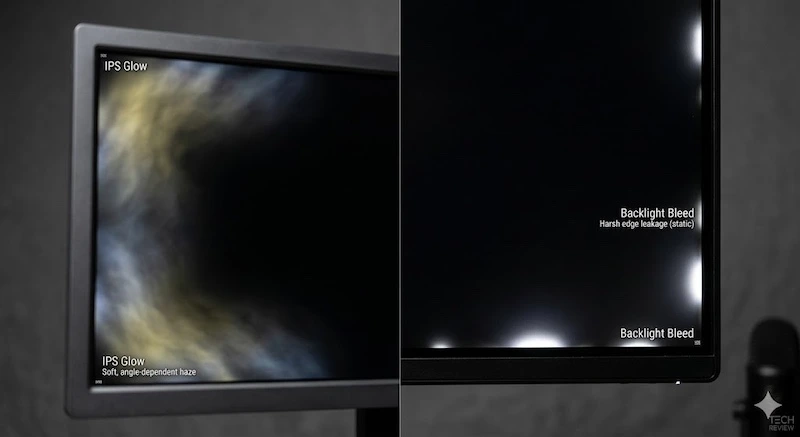 À gauche : IPS Glow (change selon l'angle). À droite : Fuite de lumière (lumière statique sur les bords).
La Fuite de Lumière se produit lorsque le cadre de l'écran LCD applique une pression inégale, provoquant une fuite du rétroéclairage sur les bords. Cela reste statique quel que soit votre angle de vue. L'IPS Glow, en revanche, est une propriété physique de la structure cristalline IPS. Il apparaît comme une brume chaude ou froide dans les coins et change d'intensité lorsque vous bougez la tête.
Uniformité et Effet d'Écran Sale (DSE)
Pour tester le DSE (Dirty Screen Effect), passez au test Gris Neutre (50%). L'effet d'écran sale ressemble exactement à ce qu'il décrit : des zones nuageuses et plus sombres sur l'écran qui ressemblent à des taches. Il est particulièrement visible dans les contenus en mouvement rapide avec des couleurs unies, comme regarder un match de football (terrain vert) ou jouer à un simulateur de vol (ciel bleu). Bien que le DSE soit présent dans presque tous les écrans LCD à un certain degré, les cas graves justifient un retour.
Foire Aux Questions
Un logiciel peut-il réparer un pixel mort ?
Non. Un véritable "pixel mort" (généralement noir pur) signifie que le transistor est définitivement cassé et ne peut pas être réparé par logiciel. Cependant, un "pixel bloqué" (qui reste rouge, vert ou bleu) peut parfois être réanimé à l'aide d'outils de clignotement de couleurs rapides.
Les fuites de lumière sont-elles couvertes par la garantie du moniteur ?
Cela dépend de la gravité et de la politique spécifique du fabricant. Une légère fuite de lumière est souvent considérée comme un artefact normal de la fabrication des écrans LCD. Cependant, si la fuite est suffisamment grave pour avoir un impact sur la visualisation normale, elle peut donner droit à un retour (RMA).
Qu'est-ce que l'effet d'écran sale (DSE) ?
Le DSE fait référence à une mauvaise uniformité de la luminance sur une dalle LCD, rendant les couleurs unies (comme un fond gris ou un ciel bleu dans un jeu) tachetées, nuageuses ou "sales". Il s'agit d'une limitation matérielle liée aux diffuseurs de rétroéclairage et ne peut pas être corrigée par étalonnage logiciel.